Alert visibility, alert grouping controls and case list enhancements
Last updated: April 7, 2026
We're excited to announce some important updates to our case management features in ComplyAdvantage Mesh that will go live on 06 Nov 2025. These updates are designed to streamline your workflow, boost transparency, and save analysts valuable time.
What’s New:
Alert Management and Grouping: Enhanced visibility of alerts and a new configuration option to enable/disable alert grouping within your case workflows.
Case List Enhancements: New features including Persistent Filters, Improved Case Navigation, Customisable Case Lists, and a new Tabbed View.
1. Alert Management and Grouping
Case Alert Visibility
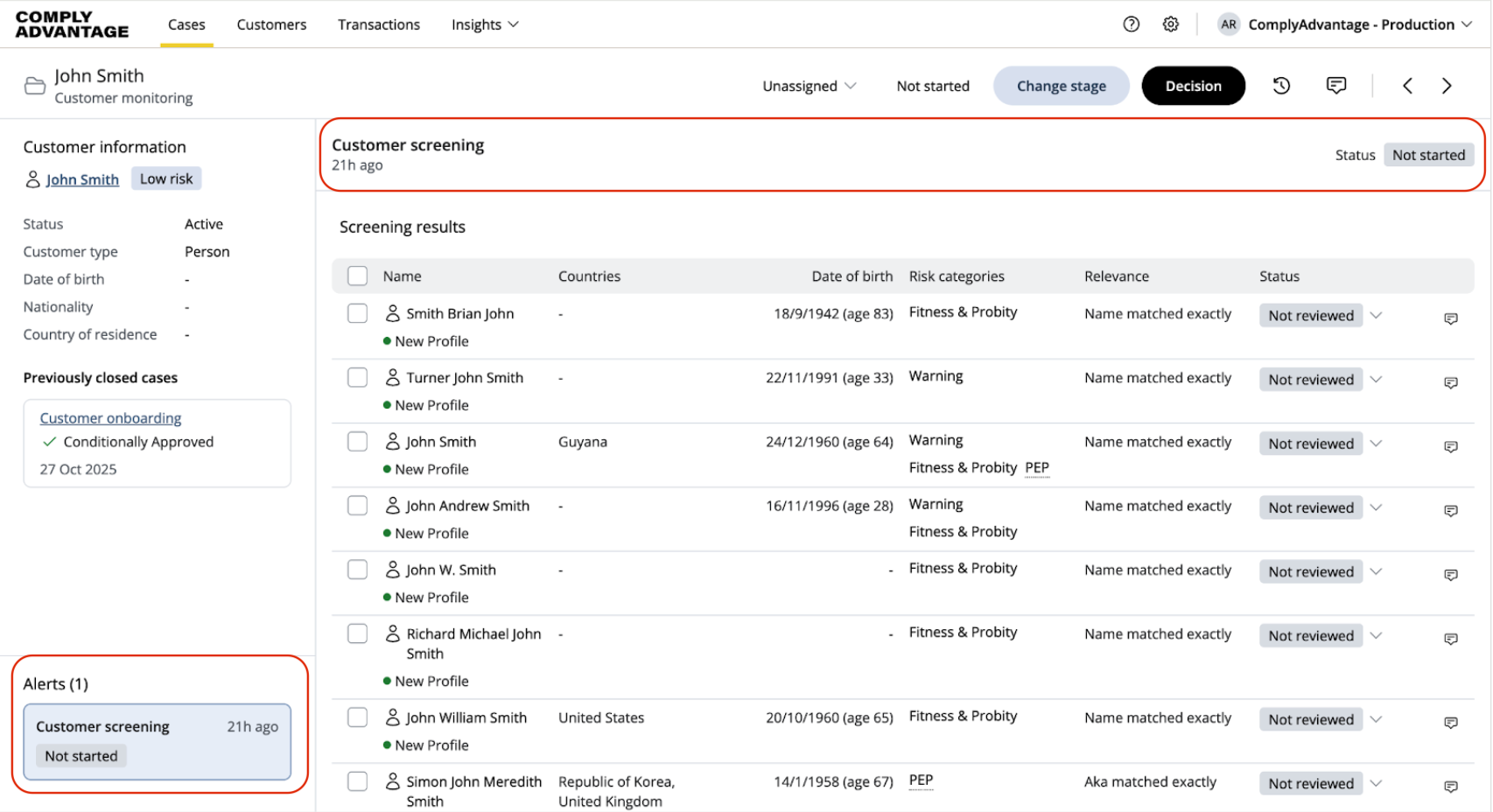
All users will now see alerts in their cases, regardless of the alert grouping configuration.
An alert is a collection of risks (e.g., screening profiles) surfaced to clients in Mesh. These are displayed within cases and group risk information, such as results from a specific monitoring search or risks related to the transaction activity of a customer.
Location: These will appear in a column on the left-hand side of the case view in all cases (for smaller screen sizes, this will move to the bottom of the customer details column).
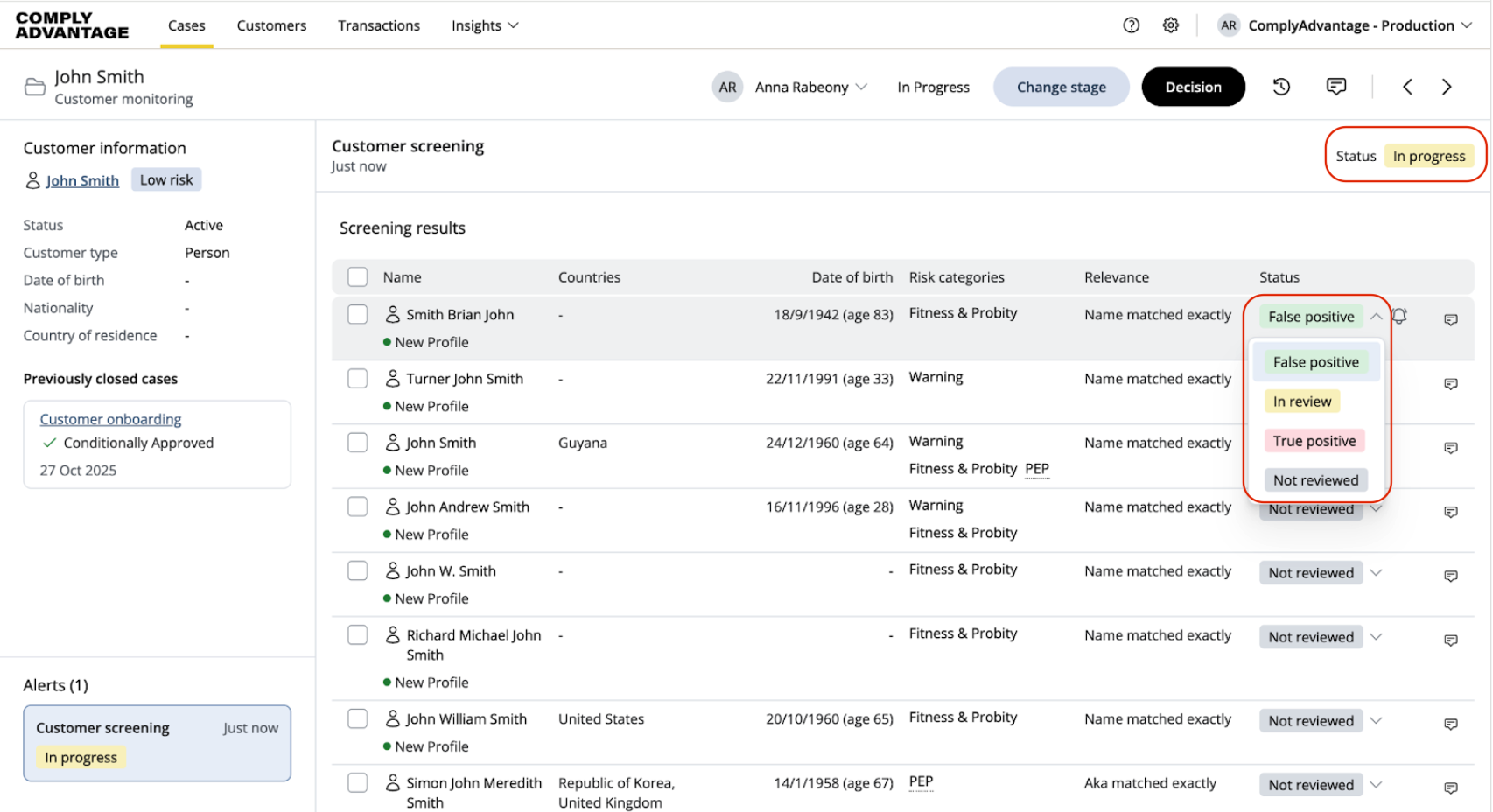
Alert Statuses: For the selected alert, you will see an alert header containing the alert name and status.
Alert statuses can be manually changed for transaction monitoring cases.
For customer onboarding, customer monitoring, and payment screening cases, the alert status will update automatically using the statuses of the profiles within it.
For more details on using alerts:
Configurable Alert Grouping within Cases
Clients will now be able to enable or disable alert grouping within their case workflows via a new self-serve configuration option.
This feature was introduced to consolidate new risk alerts into existing open cases, addressing the issue of multiple cases for the same customer and providing a more comprehensive view of risk.
Key benefits of grouping:
Consolidated information: All relevant risk details will be within a single case.
Reduced duplication: Minimises the creation of redundant cases.
Simplified management: Analysts can focus on analysis rather than managing multiple cases.
Action Required for API Users: API users will need to update their processes to use the new "case alert list updated" webhook that will provide real-time notifications when new alerts are added to a case.
For more details on the grouping of alerts:
2. Case List Enhancements
We have also released several enhancements to the Case List designed to save navigation time and personalize a user's view:
Persistent Filters
Filters applied to case lists will now remain active even after you navigate away or log out and back in. This means you don’t have to repeatedly apply the same filters.
Case-to-Case Navigation
You can now navigate from one case to another directly, without having to return to the case list. You will see arrows on the top right corner when you open a case, allowing you to move to the next or previous case in the list.
Customisable Case List
You can choose columns you want visible on the case list to prioritise the ones you use the most, and can also re-order them.
Tabbed Case List View
If you use both customer screening and transaction monitoring on Mesh, you will see separate case lists for both, including a combined one. This makes it easier to focus on the case list by case type, as the filters and columns on these tabbed views are specific to the case type. This view is visible only if you have access to both case types and will appear once you have cases for each type in the case list.
Release Date
All these updates will go live on 06 Nov 2025.
Action Summary:
To enable alert grouping for any of the case workflows, please use the configuration option.
For all other updates, there’s no action needed from your side.
If you have any questions, please contact [email protected].