What are data exports?
Last updated: April 7, 2026
You can export data from ComplyAdvantage Mesh as a .CSV file. This can help you to create management reports or analyse the efficiency and effectiveness of your compliance program.
There are four data exports available:
This article explains the format and contents of each of these exports.
Customer screening
The Customer Screening export provides details about the customers screened, the date and time of the screening, and the match results.
This information is essential for understanding your screening processes. You can use it to calculate metrics such as the number of screenings over time, match rates and the average number of hits per match.
Each row in the export represents one screening.
These are the fields in the export:
Column | Field name | Description |
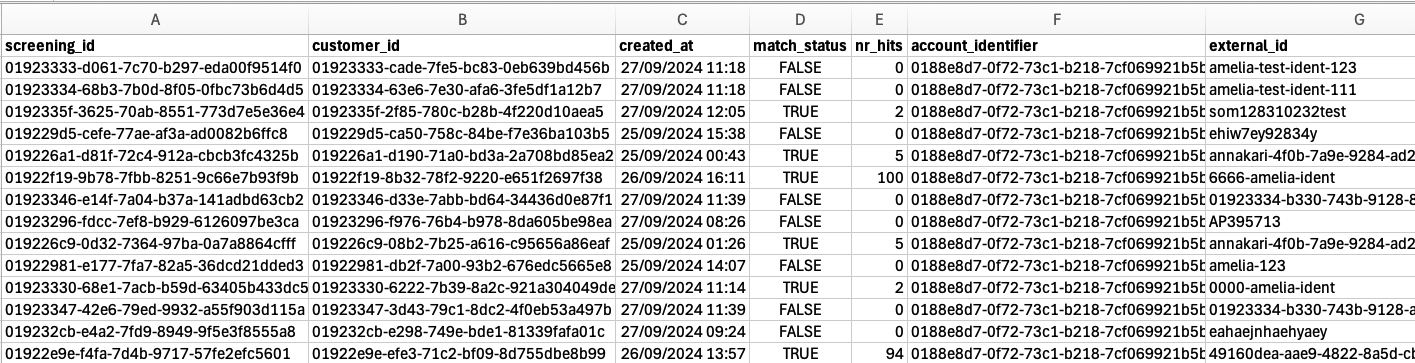
A | screening_id | A unique ID for the screening. |
B | customer_id | The unique customer ID generated by ComplyAdvantage. |
C | created_at | The timestamp of when the screening took place. |
D | match_status | Indicates whether a screening returned any hits with TRUE or FALSE. |
E | number_of_hits | The total number of hits returned for a given screening. |
F | account_identifier | Your ComplyAdvantage account ID. This will be the same for all the rows of the export. |
G | external_id | Your unique ID for the customer. This ID is generated by you and is your reference for the customer. |
The screenshot below shows an example of the Customer Screening export. The columns are A to G from left to right.
Customers
The Customer export contains information about your customers, including their creation date and monitoring status. It also details each customer's risk level and their case count.
Each row in the export represents one customer.
These are the fields in the export:
Column | Field name | Description |
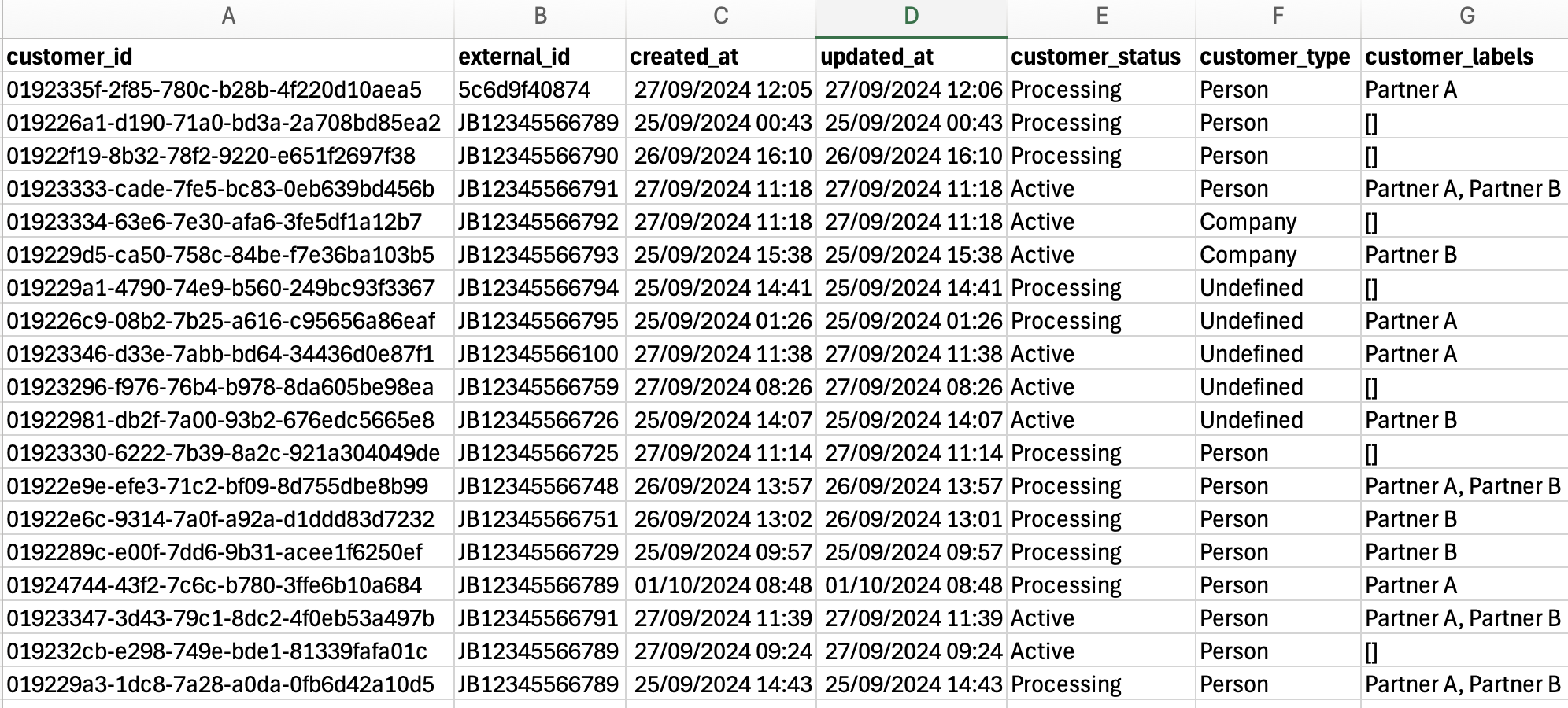
A | customer_id | The unique customer ID generated by ComplyAdvantage. |
B | external_id | Your unique ID for the customer. This ID is generated by you and is your reference for the customer. |
C | created_at | The date and time the customer was created. |
D | updated_at | The date and time when the customer was updated. |
E | customer_status | The status of a customer (processing, active or closed). |
F | customer_type | The type of customer (person or company). |
G | customer_labels | The labels associated with this customer |
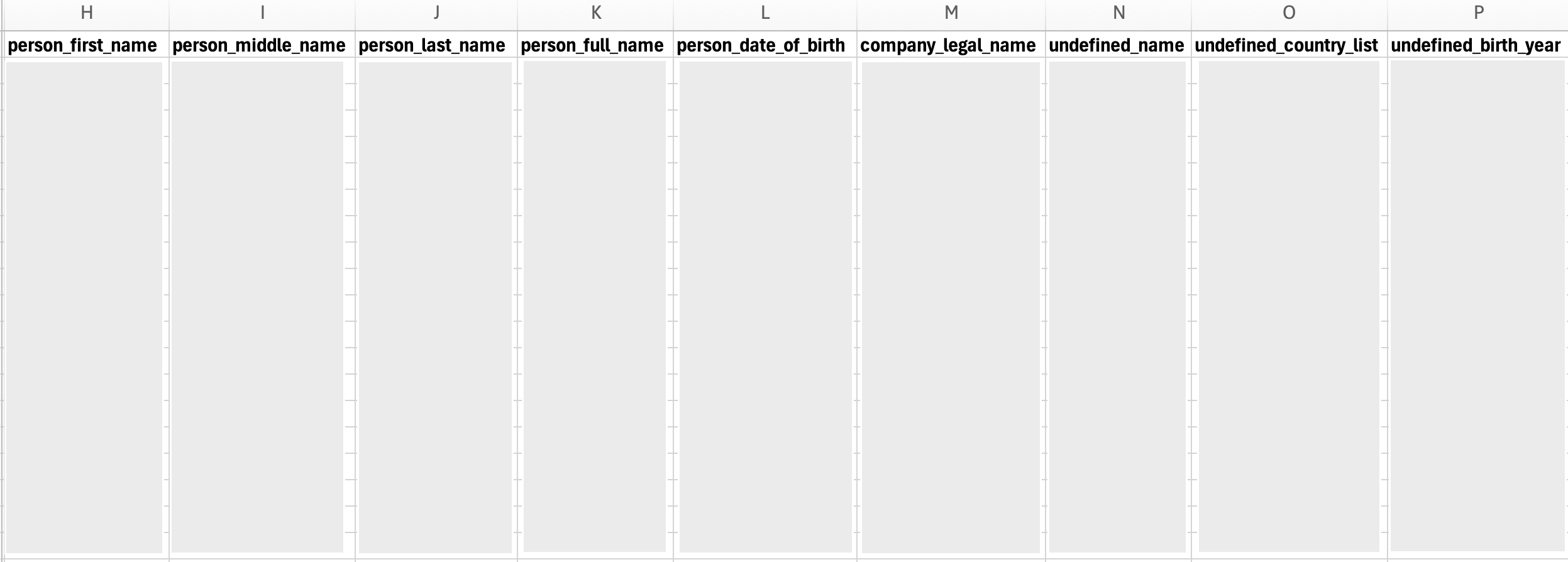
H | person_first_name | The first name of the customer if the type is person. |
I | person_middle_name | The middle name of the customer if the type is person. |
J | person_last_name | The last name of the customer if the type is person. |
K | person_full_name | The full name of the customer if the type is a person, and if their name information was provided as a single field. |
L | person_date_of_birth | The date of birth of the customer if the type is a person. |
M | company_legal_name | The legal name of the customer if the type is company. |
N | undefined_name | The name of the customer for a customer where the customer type was not provided and hence is categorised as 'undefined'. |
O | undefined_country_list | Countries associated with a customer where the type is 'undefined'. |
P | undefined_birth_year | Year of birth of a customer where the type is 'undefined' . |
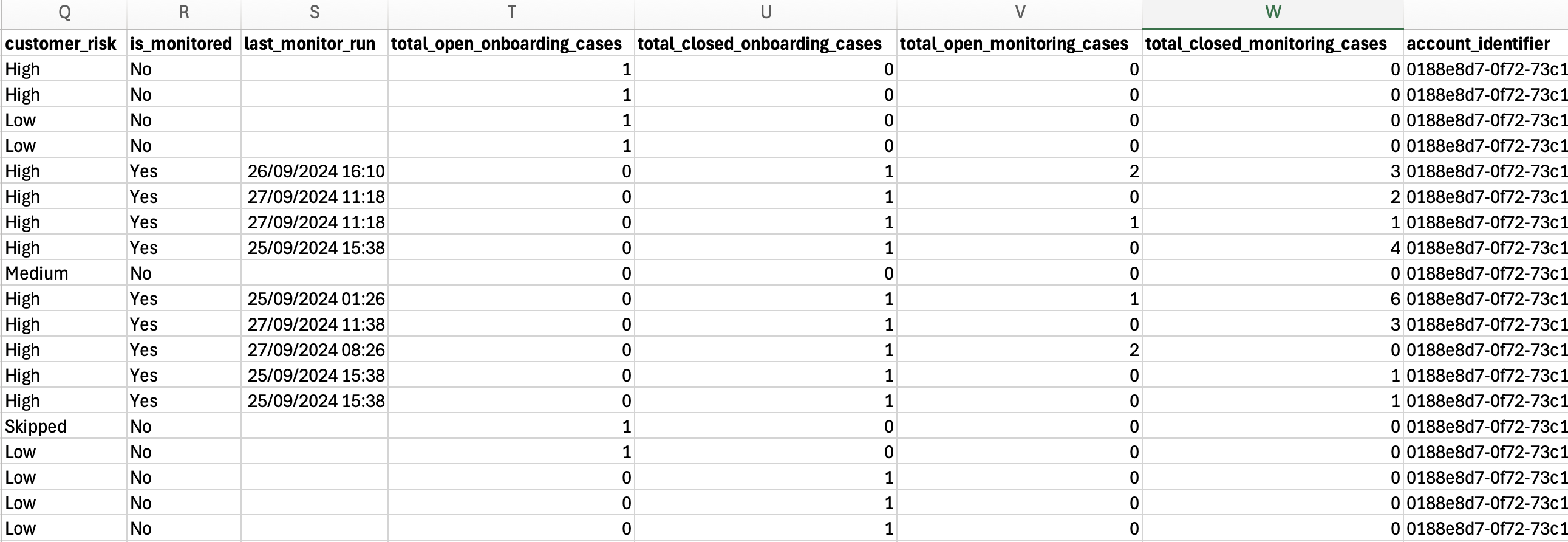
Q | customer_risk | The overall risk level of a customer (low, medium, high, prohibited or unspecified). |
R | is_monitored | Whether the customer is being monitored on an ongoing basis (YES or NO). |
S | last_monitor_run | The date and time the customer was last monitored. |
T | total_open_onboarding_cases | The number of open onboarding cases associated with the customer. |
U | total_closed_onboarding_cases | The number of closed onboarding cases associated with the customer. |
V | total_open_monitoring_cases | The number of open monitoring cases associated with the customer. |
W | total_closed_monitoring_case | The number of closed monitoring cases associated with the customer. |
X | account_identifier | Your ComplyAdvantage account ID. This will be the same for all the rows of the export. |
Y | acquisition_source | The source through which the customer was acquired |
The screenshots below show examples of the Customer export. The first screenshot shows columns A to G:
Here are columns G to P (data has been redacted):
Here are the columns Q to X
Screening and monitoring cases
The Screening and Monitoring Cases export contains the creation date, type and decision for each case. It also shows who worked on the case and the screening configuration applied. There are customer details, so that the exported data can be paired with your data for analysis.
Each row in the export represents one case.
These are the fields in the export:
Column | Field name | Description |
A | case_id | The unique ID for a case. |
B | case_type | The type of the case (onboarding or monitoring). |
C | case_state | The latest status of the case. You can customize the statuses but the defaults are:
|
D | created_at | The date and time the case was created. |
E | updated_at | The date and time the case was last updated. |
F | assignee_id | The unique ID of a ComplyAdvantage Mesh user assigned to a case. |
G | external_id | Your unique ID for the customer. This ID is generated by you and is your reference for the customer. |
H | customer_type | The type of customer (person or company). |
I | customer_labels | The labels associated with this customer. |
J | customer_risk | The overall risk level of a customer (low, medium, high, prohibited or unspecified). |
K | person_first_name | The first name of the customer if the type is person. |
L | person_middle_name | The middle name of the customer if the type is person. |
M | person_last_name | The last name of the customer if the type is person. |
N | person_full_name | The full name of the customer if the type is a person, and if their name information was provided as a single field. |
O | person_date_of_birth | The date of birth of the customer if the type is person. |
P | company_legal_name | The legal name of the customer if the type is company. |
Q | undefined_name | The name of the customer for a customer where the customer type was not provided and hence is categorised as 'undefined'. |
R | undefined_country_list | Countries associated with a customer where the type is 'undefined'. |
S | undefined_birth_year | Year of birth of a customer where the type is 'undefined'. |
T | screening_id | The unique ID of the screening that triggered a case. |
U | screening_type | The origin of the screening (onboarding or monitoring). |
V | screening_configuration_id | The ID of the screening configuration used to screen or monitor the customer. |
W | screening_configuration_name | The name of the screening configuration used to screen or monitor the customer. |
X | number_of_profiles | The number of profiles returned for a given case. |
Y | Sanctions | The number of profile hits for Sanctions. |
Z | Warnings | The number of profile hits for Warnings. |
AA | Fitness and probity | The number of profile hits for Fitness and probity. |
AB | PEP | The number of profile hits for politically exposed persons (PEPs). |
AC | PEP Class 1 | The number of profile hits for PEP Class 1. |
AD | PEP Class 2 | The number of profile hits for PEP Class 2. |
AE | PEP Class 3 | The number of profile hits for PEP Class 3. |
AF | PEP Class 4 | The number of profile hits for PEP Class 4. |
AG | Adverse Media | The number of profile hits for Adverse Media. |
AH | account_identifier | Your ComplyAdvantage account ID. This will be the same for all the rows of the export. |
The screenshots below show examples of the Screening and Monitoring Cases export. The first screenshot shows columns A to G:
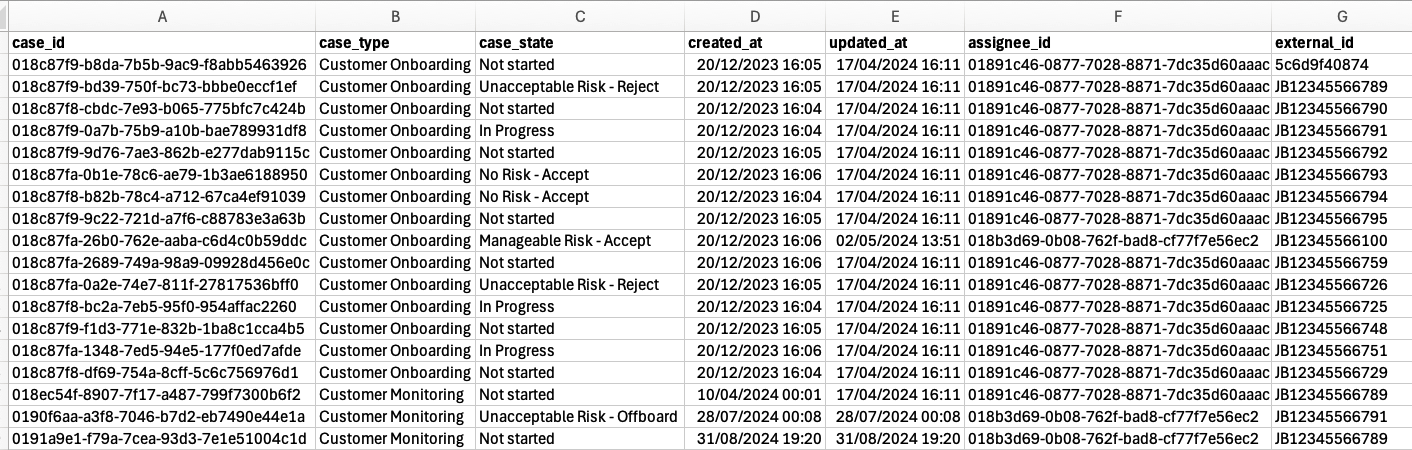
Here are columns G to O (some data has been redacted):
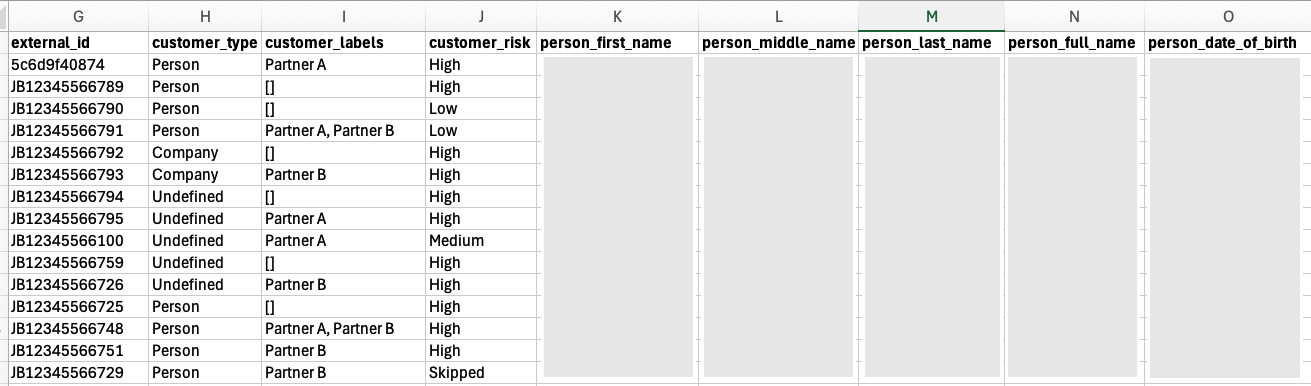
Here are columns P to W (some data has been redacted):
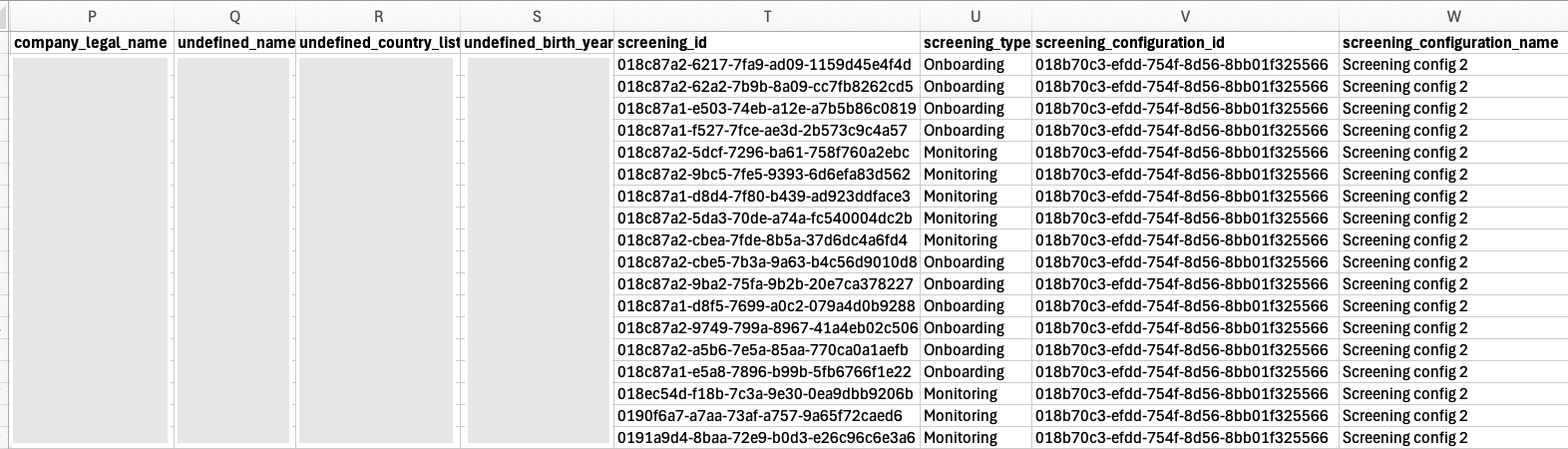
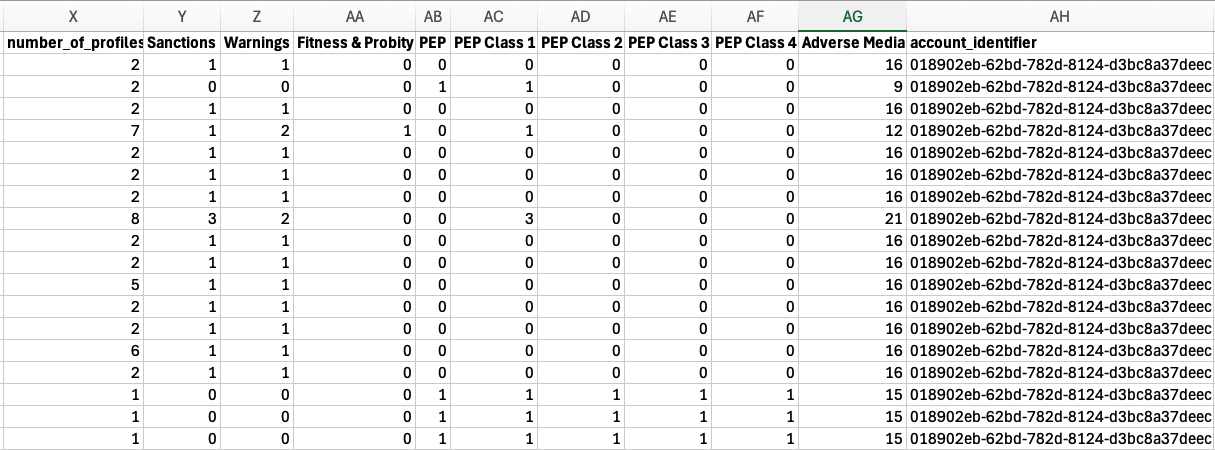
Here are the columns X to AH:
Profiles
When a customer is screened against the ComplyAdvantage database and there are matches, the screening results are returned as individual profiles. A profile is a collection of information about a person or company.
The screening and monitoring cases exports give you the total number of profiles broken down by anti-money laundering (AML) types within a case. The profiles export lists all the profiles that were created and can be used to identify which sources are producing a lot of results, and how many of those are true positives.
Each profile is linked to the screening that generated the hit and the associated customer. This enables data to be paired for analysis of the true positive (TP) and false positive (FP) decision ratios, as well as the type and level of risk found during initial customer screening.
Each row in the export represents one profile.
These are the fields in the export:
Column | Field Name | Description |
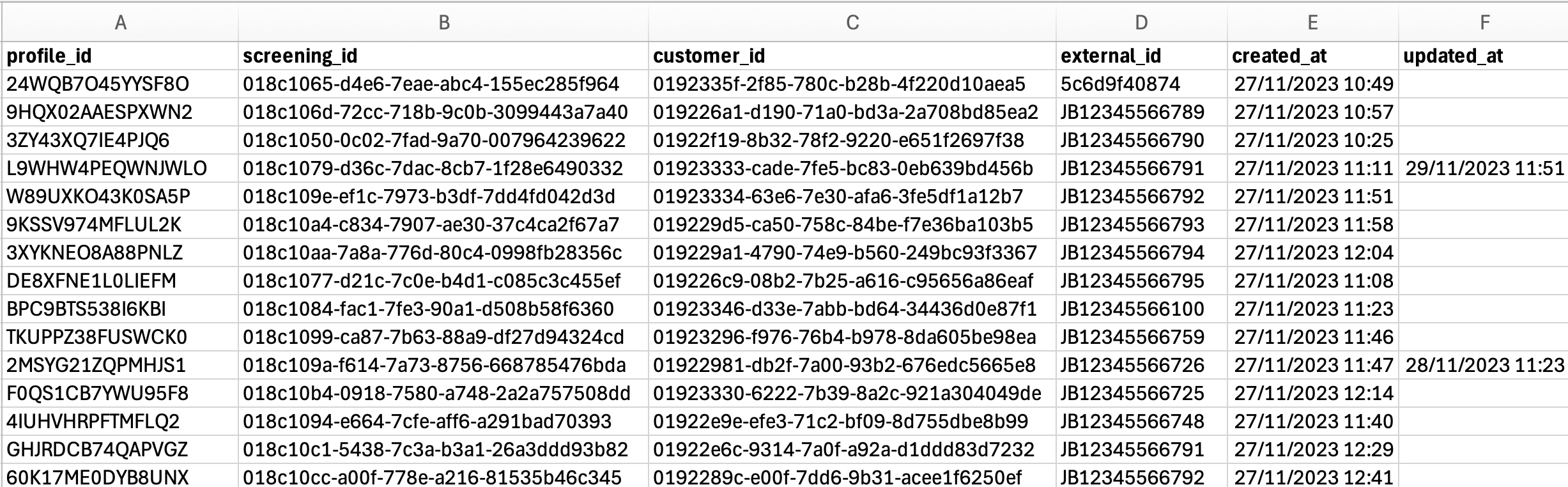
A | profile_id | The unique identifier for each profile generated by ComplyAdvantage. |
B | screening_id | The unique ID of the screening that returned a hit. |
C | customer_id | The unique customer ID generated by ComplyAdvantage. |
D | external_id | Your unique ID for the customer. This ID is generated by you and is your reference for the customer. |
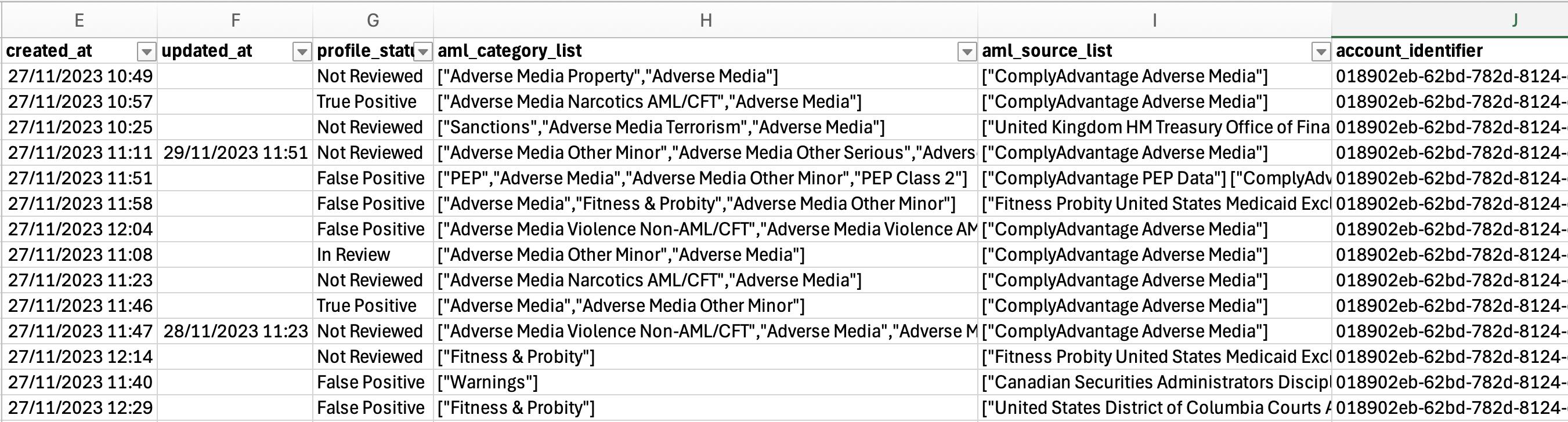
E | created_at | The date and time when the initial screening took place. |
F | updated_at | The date and time when the profile status was last updated. |
G | profile_status | The latest status of a profile. The statuses are:
|
H | aml_category_list | The list of anti-money-laundering (AML) categories associated with a profile. The categories are:
|
I | aml_source_list | The list of sources associated with the corresponding AML category for a given profile (for example: OFAC). |
J | account_identifier | Your ComplyAdvantage account ID. This will be the same for all the rows of the export. |
The screenshots below show examples of the Profiles export. The first screenshot shows columns A to F:
Here are columns E to J:
For more details, see: